
Give the evidence some room.
A laptop or desktop offers room to compare the files. Follow the device guidance on the individual case page.
Cold Case Inc
Choose a fictional investigation, open the case in your browser and work through the evidence. Here is how to get started, what to look for and how to reach your conclusion.
Watch a real investigation in 45 seconds · Practise with two free detective puzzles
01 / Choose your investigation
Browse the collection and compare the story, difficulty and estimated playing time. Open a case page to see the evidence and tools included in that investigation.
Investigate on your own or share a screen and compare theories. Everyone takes part in the detective work; there are no suspect roles to assign or scripts to perform.
Browse the case collectionFind advice for playing solo or planning an investigation for two.
02 / Open the case
After buying a case, sign in to your Cold Case Inc account to open the investigation. The game runs in your browser, so there is no game to install.
Start with the opening brief. Get familiar with the people, places and events, then explore the files and tools available in your case.
Open your account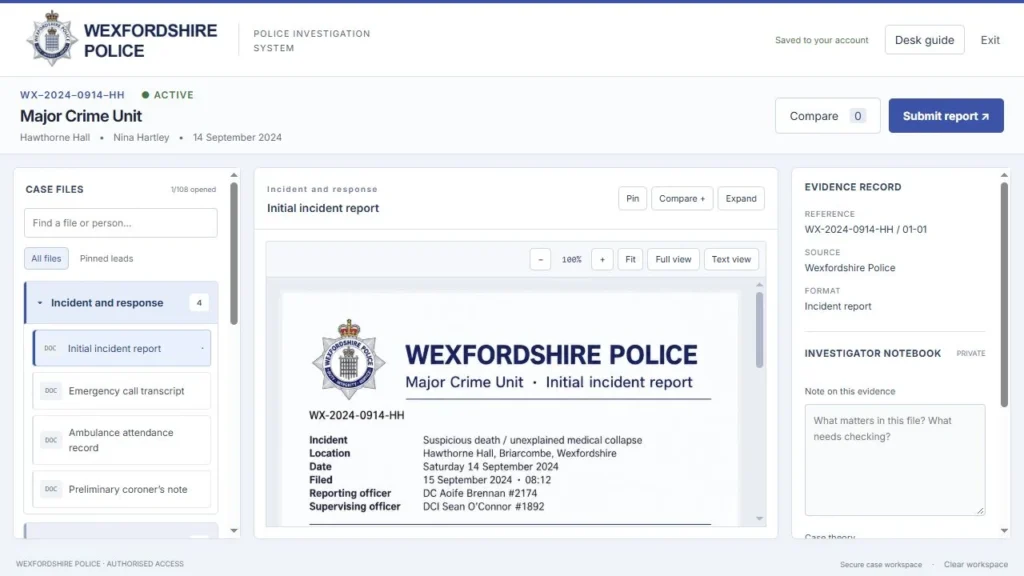

03 / Follow the evidence
Read the statements, examine the records and look for details that agree or contradict one another. Compare dates, movements and relationships before settling on a suspect.
Keep a short list of what you know and what you still need to explain. Revisit evidence when a new detail changes your theory. Some investigations reveal material or unlock tools as you progress.
Different cases combine written files, recorded material and digital clues in different ways. Check your case page for the tools included.
Explore the detective gameplay04 / Reach your conclusion
When you think you understand what happened, follow the case’s instructions to submit your conclusion. Which details support your answer? Can you explain the apparent contradictions?
Review the outcome and the case’s resolution. If your answer does not fit, return to the files and test the part of your theory that is still uncertain.
Before you begin
A little preparation helps you focus on the evidence once you open the case.
A laptop or desktop offers room to compare the files. Follow the device guidance on the individual case page.
A notebook helps with names, timings and unanswered questions. Check your case for any built-in note tools.
Use the estimated playing time to plan your session. Reading closely and discussing theories can make it longer. Return to unlocked cases through your account.

Your first case is on us
Flat 33 is a complete short investigation designed to take around 10–12 minutes. Follow the evidence and reach a conclusion before choosing a longer case.
Enter your name and email to receive a private sign-in link. No payment is needed, and newsletter signup is optional.
Play Flat 33 free →Before you open the file
No game installation is required. The investigation runs in your browser. Check the individual case page for device guidance and the evidence included.
You can investigate on your own, or share a screen and work through the clues together. Everyone takes part in the detective work; you do not need to assign suspect roles or perform a script.
You can return to your unlocked cases through your Cold Case Inc account. Keep a note of your current theory and the evidence you want to revisit.
Check the individual case page for its estimated playing time. The time you spend reading, replaying material and discussing theories will affect the length of your investigation.
No. The investigation itself takes place online. Some cases include optional printable materials; check the individual case page for what is included.
No. Cold Case Inc investigations are fictional. The characters, police-style records and other story materials are created for the game.